Unlimited Data Storage Possibilities within One Software
With Open-E JovianDSS, you have unlimited options to build your data storage environment, no matter what the size or business model of your company is. You can choose between file storage (NAS), and block storage (SAN), as well as iSCSI, Fibre Channel (FC), NFS, or SMB (CIFS) and NVMe-oF protocols. The most popular virtualization systems, such as VMware, Proxmox, Citrix, or Microsoft Hyper-V, are also available.
Open-E JovianDSS is Linux-based Software-defined Storage that gives you flexibility in terms of data storage architecture. It can be set up on physical servers or as a virtual storage appliance in hyper-converged environments. It's also hardware-agnostic and provides you with much better hardware compatibility than competing products based on other operating systems.
Ensure your data availability with either the Shared High Availability Cluster or Non-Shared High Availability Cluster architectures, supported by Open-E JovianDSS, and choose the solution best tailored to your business objectives.


Open-E JovianDSS Key Details
Open-E JovianDSS incorporates advantages from both the Linux kernel and ZFS file system to provide you with a unique mix of data storage benefits, which you can find listed below.
- 128-bit ZFS file system
- Linux-based
- Pooled storage model
- iSCSI, Fibre Channel (FC), NFS, SMB (CIFS), NVMe-oF, Virtual IPs
- Unlimited scalability with storage expansion during production
- Unlimited file and volume size
- Unlimited Snapshots and Clones
- Hardware-agnostic
- Certified for Virtualization (Hypervisor-agnostic)
Open‑E JovianDSS Key Features & Benefits
Data Acceleration
With Open-E JovianDSS you can take full advantage of your data storage appliances' performance thanks to:
- Acceleration of random writes with Write Log (ZIL)
- Hybrid Read Cache with the first level in RAM (ARC -Adaptive Replacement Cache) and second Read Cache level on an SSD or NVMe (L2ARC)
- High cache hit rate by using ARC's most recently used (MRU) and most frequently used (MFU) Read Cache algorithms
- Data resilvering of used space only
- ZFS Special Devices used to store specific types of data, such as metadata or small file blocks, on dedicated high-performance data storage devices like SSDs or NVMes
Data Integrity and Protection
Protection against data loss is a key challenge these days and Open-E JovianDSS is the core of your infrastructure's security thanks to:
- Data and metadata check-summing
- Self-healing to detect and correct silent data errors with Scrub utility
- Atomic Transaction Writes to keep data consistent
- Transactional copy-on-write I/O operations that eliminate silent data corruption and data fragmentation
- Storing multiple copies of user data
Data Optimization
You will have the ability to save data storage space with the following
Open-E JovianDSS features:
- Inline Compression (LZ4, LZJB, ZLE, GZIP 1..9)
- Inline Deduplication
- Thick, Thin and Over-Provisioning
- Lightweight snapshots and clones taking up space once changes are made only
- NVMe Partitioning
User Authentication & System Monitoring
Open-E JovianDSS enables access to both internal and external administration tools like:
- User Authentication through Local LDAP users and groups authentication for SMB/CIFS protocol, as well as through external active domain server
- Open-E JovianDSS System Monitoring with SNMP, Nagios or Checkmk, as well as general GUI statistics
Check out our latest information
 Case Study
High-Performance Hyperconverged Metro Cluster Solution for Sipafer S.p.A.
See how Sipafer S.p.A. modernized its wholesale operations using an OpenStor JovianDSS Metro Cluster designed by Share and powered by Open-E JovianDSS software.
 Webinar Video
WEBINAR | Cut Proxmox VE Data Storage Costs 20% | Open-E JovianDSS Plugin Overview & Live Demo
Watch a detailed solution breakdown showing where the 20% savings come from, followed by an in-depth live demo by Janusz Bak, Open-E CTO, who demonstrates the full feature set and functionality step-by-step.During the webinar we received a number of questions. As promised here we provide all the answers from our Q&A session:[ ? ] Can I send the ZFS snapshots to PBS, or is it Proxmox Backup Server taking the backups?Currently, you cannot send ZFS snapshots directly to Proxmox Backup Server (PBS). However, developers and the community are actively working on a plugin solution to integrate ZFS snapshot transfers with PBS in the future.[ ? ] Is this a single plugin for both iSCSI and NFS, or are there two separate plugins?It is a single plugin that contains both iSCSI and NFS functionality built into it. It was initially advertised for iSCSI while NFS was undergoing QA testing, but both capabilities were included in the same plugin from the beginning and are now fully supported.[ ? ] Can Proxmox operate over iSCSI with a Open-E JovianDSS HA Metro Cluster as the target? Proxmox runs on several independent servers (hypervisors)?Yes. A Open-E JovianDSS HA Metro Cluster running on separate bare-metal servers can provide iSCSI storage to multiple Proxmox hosts or even multiple Proxmox clusters. This is supported through the cluster-prefix property in the plugin configuration.[ ? ] Are there any performance differences of VMs when comparing iSCSI vs NFS?The performance difference is very minimal and comparable, depending on whether you measure random or sequential reads/writes. However, iSCSI is preferred for mission-critical setups because it supports true switch-agnostic multipathing, whereas NFS requires network bonding, which depends on specific switch capabilities and can encounter issues during network disruptions.[ ? ] Is PBS using a Open-E JovianDSS Pool as Backup Storage, or is it using disks of the 3rd PVE Node in this demo?In the demo, PBS uses local disks on the Proxmox server (configured as a local ZFS pool passed through to the PBS instance), not a Open-E JovianDSS pool. The setup relies directly on built-in ZFS capabilities within PBS, so Open-E JovianDSS is not required for backup storage here.[ ? ] In case we use NFS isn't better to backup snapshots to 3rd Open-E JovianDSS instance on that 3rd server?Yes. When using NFS, Open-E JovianDSS On- and Off-site Data Protection (OODP), the built-in backup and replication functionality, can be used as a backup and disaster recovery solution. With the NFS part of the plugin, multiple virtual disks are stored in a single ZFS dataset. A single OODP replication task can therefore back up all virtual disks stored in that dataset at the same time.[ ? ] Does Metro Cluster need extra Network interfaces between the Open-E VM on the PVE?Yes. The Metro Cluster requires a dedicated Mirror Path. The recommended configuration is a switchless, direct point-to-point connection using either a single network interface or bonded interfaces. In our webinar demo, we configured one NIC as a PCI passthrough device. As a result, Open-E JovianDSS sees it as a physical NIC rather than a virtual interface. This passthrough NIC is used for the Mirror Path. The passthrough NICs in pve1 and pve2 are connected directly to each other using a point-to-point connection, without a network switch. A direct point-to-point connection is recommended for the Mirror Path, although a switched network connection is also supported.
 Certified Server
Open-E JovianDSS HA2026-HC Cluster-in-a-Box
The Open-E JovianDSS HA2026-HC Cluster-in-a-Box is a high-availability, purpose-built data storage system engineered for mission-critical enterprise workloads. Developed in collaboration with Abacus and AIC, this solution combines high-performance all-flash NVMe hardware with enterprise-grade software-defined storage. Featuring active-active dual-node redundancy, full ZFS data integrity, native dataset encryption, real-time deduplication, and automated self-healing, it delivers seamless zero-downtime operation for demanding environments.
 Solution
Open-E JovianDSS Integration with Proxmox VE - Efficient Virtualization with Open-source Solution
See how our team took hypervisor-agnosticism to the next level! Experience a new, stable, and reliable way of managing your virtual machines & their data thanks to Open-E JovianDSS storage back-end for Proxmox VE!
More Open-E JovianDSS Features
Backup Solution
Keep your Data Secure with the Comprehensive Backup Solution
Business Continuity & Disaster Recovery
Protect Your Business from Disruptions & Data Loss
Want to Learn More?
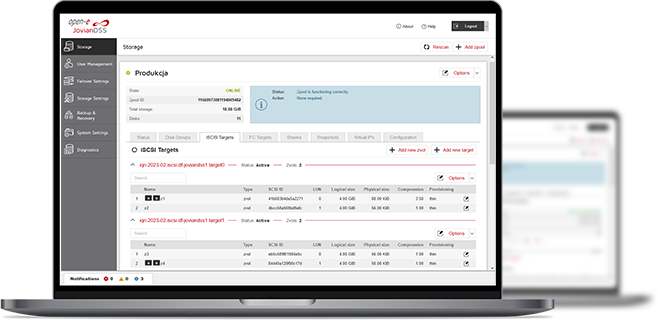
3-in-1 Complete Data Storage Solution
Accelerate Your Data Storage with ZFS-based Storage System

Find the Exact License for Your Storage Setup
This calculator helps you to find the exact license required for your storage setup with Open-E JovianDSS, based on your individual specification.
Enter the configuration of your choice into the calculator and generate a PDF report.
Open-E Library