Prevent Data Loss with Efficient Open-E JovianDSS-based Backups
Open-E JovianDSS backup features are powerful and flexible, as they cover a wide range of possible worst-case scenarios, so you don't have to use any additional third-party tools. Built-in backup solution based on Open-E JovianDSS utilizes advanced ZFS technology to ensure data integrity with snapshots and replication, providing peace of mind through robust disaster recovery options.
Moreover, its intuitive management interface simplifies the configuration and monitoring of backups, streamlining the process to save time and reduce potential human errors.
Backup of Everything
Copies of all kinds of data are consistent, including databases and running virtual machines with all of their applications and data.
Instant Access To and Restore of Previous Data Versions
Old data versions can be accessed and restored quickly, since they are kept in the original form. Users can instantly start using their backed up data. Also, every user has a direct access to "Previous Versions" via SMB on MS Windows clients.
Optional Removal and Rotation of Backup Media
Thanks to Pool Export and Import functionalities, users can safely remove backup media (disks), rotate with other sets, or ship to another location.
Encrypted Transfer
The data stream is sent via SSH for safe transfer via the Internet.
Protection Against Ransomware
Very frequent snapshots with instant access to all data provide a quick way to roll back to the state before a virus attack.
Backup Window Problem Solved
The backup window is reduced to minutes since only data changes are replicated within every interval. Additionally, the backup is offloaded from the client machine to the storage server.
Very Light Backup Engine
Continuous interval-based replication works in the background with insignificant influence on production. There is an option to skip virtual machine snapshots in very heavy-load timeframes in VMware environments.
Open‑E JovianDSS On- & Off-site Data Protection
The On- & Off-site Data Protection feature in Open-E JovianDSS Data Storage Software allows you to backup and restore crucial company data in case of an unexpected disaster due to a combination of several technologies:
- On-Site Backups
- Off-Site Backups
- Flexible Retention Plans
- Snapshots and Clones
With this feature, you can fully experience the flexibility of our data storage solution, which covers a wide range of disaster recovery scenarios without the need to use additional third-party tools.
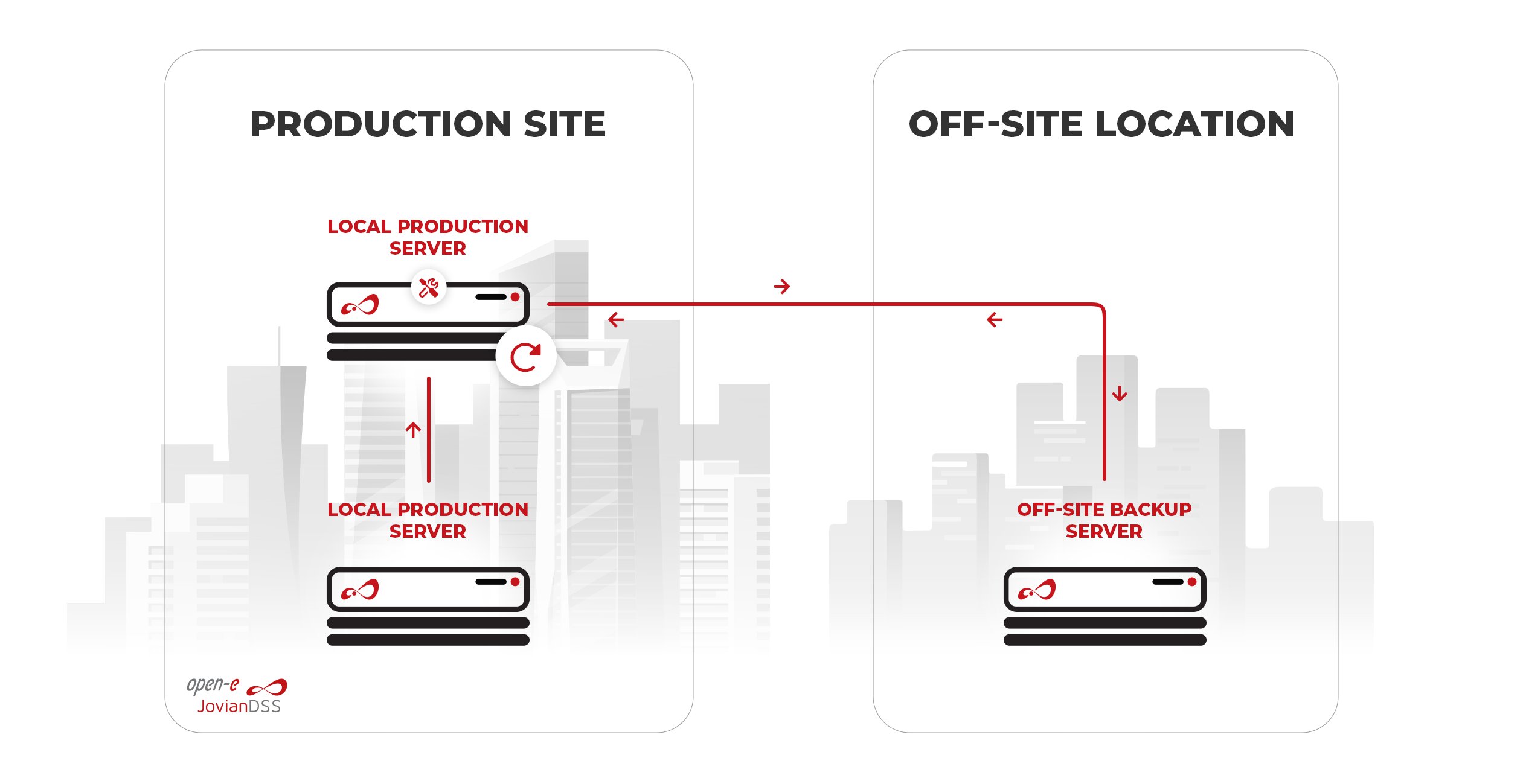

On-site (Local) Backups
On-site backups are kept at your place of business on the same server with additional internal drives, external drives or on other local Open-E JovianDSS-based servers. Such a kind of backup is the most suitable for data protection when a company encounters ransomware attacks, hardware failure, or other disasters. Due to location, data restoration is usually easier and faster than in the case of an off-site backup. Therefore, it is a perfect solution for hot data, which can be restored with minimized downtime or even instantly by switching to the backup copy.
Off-site (Remote) Backups
Off-site backups are backed up to a geographically different location. Such backup secures the data in case of e.g. theft, flood, fire, power outages, etc. In case of such disasters, the data can be restored to a new primary location, or, in some solutions, the backup can take the primary server's role, and the data can be accessed instantly. The data transfer is secured by encryption. This kind of backup is also suitable for archiving purposes. It is also possible to set up several backup locations.

Open-E JovianDSS Retention Plans
Using the retention plans, you can control snapshots' automatic creation and deletion, both on the source and destination side of things. These plans of one or multiple rules, defined by an interval and a retention period. The interval sets how often a snapshot should be taken and the retention period - how long each snapshot should be kept.
Open-E JovianDSS Consistent Snapshots
Open-E JovianDSS enables creating an unlimited number of snapshots, i.e., point-in-time copies of data, on the source volumes. Data from a snapshot can be instantly restored via the rollback feature or an additional volume (clone).
With the On- & Off-site Data Protection feature, snapshots are asynchronously replicated to local and/or remote locations according to a retention plan that can be customized specifically to individual requirements. Since snapshots keep only the data that has changed between subsequent snapshots, only the changes are transferred to the destination location as well.
Learn More About Open‑E JovianDSS
Data Protection Features
File size: 44.4 MB
Do you want to learn more about this and other backup solutions offered by Open-E that prevent you from downtime or losing your data, while in return offering Business Continuity and Disaster Recovery
- The step-by-step analysis of the modern world data storage threats
- Journey through The Data Storage Protection Layers
- List of questions to ask yourself before creating the ultimate Business Continuity and Disaster Recovery Plans
- Tips on how to manage risks in terms of the Business Continuity of your company
Check out our latest information
 News
News
Open-E CEO Krzysztof (Kristof) Franek Attending SC 2026 in Chicago
Open-E CEO Krzysztof (Kristof) Franek will join SC 2026 in Chicago, Nov 15–20. Feel free to meet him and discuss the latest Open-E JovianDSS Proxmox VE integration.
 Tutorial
Video Tutorial: Native ZFS Encryption in Open-E JovianDSS Up33
Join Open-E Technical Support Engineer Andy Komonchak for an in-depth walkthrough of Native ZFS Encryption in Open-E JovianDSS Up33. In this step-by-step guide, Andy breaks down the technical mechanics of the feature and shows you how to secure your datasets and volumes using the built-in software tools in the latest release of our data storage software.
 Case Study
High-Performance Hyperconverged Metro Cluster Solution for Sipafer S.p.A.
See how Sipafer S.p.A. modernized its wholesale operations using an OpenStor JovianDSS Metro Cluster designed by Share and powered by Open-E JovianDSS software.
 Webinar Video
WEBINAR | Cut Proxmox VE Data Storage Costs 20% | Open-E JovianDSS Plugin Overview & Live Demo
Watch a detailed solution breakdown showing where the 20% savings come from, followed by an in-depth live demo by Janusz Bak, Open-E CTO, who demonstrates the full feature set and functionality step-by-step.During the webinar we received a number of questions. As promised here we provide all the answers from our Q&A session:[ ? ] Can I send the ZFS snapshots to PBS, or is it Proxmox Backup Server taking the backups?Currently, you cannot send ZFS snapshots directly to Proxmox Backup Server (PBS). However, developers and the community are actively working on a plugin solution to integrate ZFS snapshot transfers with PBS in the future.[ ? ] Is this a single plugin for both iSCSI and NFS, or are there two separate plugins?It is a single plugin that contains both iSCSI and NFS functionality built into it. It was initially advertised for iSCSI while NFS was undergoing QA testing, but both capabilities were included in the same plugin from the beginning and are now fully supported.[ ? ] Can Proxmox operate over iSCSI with a Open-E JovianDSS HA Metro Cluster as the target? Proxmox runs on several independent servers (hypervisors)?Yes. A Open-E JovianDSS HA Metro Cluster running on separate bare-metal servers can provide iSCSI storage to multiple Proxmox hosts or even multiple Proxmox clusters. This is supported through the cluster-prefix property in the plugin configuration.[ ? ] Are there any performance differences of VMs when comparing iSCSI vs NFS?The performance difference is very minimal and comparable, depending on whether you measure random or sequential reads/writes. However, iSCSI is preferred for mission-critical setups because it supports true switch-agnostic multipathing, whereas NFS requires network bonding, which depends on specific switch capabilities and can encounter issues during network disruptions.[ ? ] Is PBS using a Open-E JovianDSS Pool as Backup Storage, or is it using disks of the 3rd PVE Node in this demo?In the demo, PBS uses local disks on the Proxmox server (configured as a local ZFS pool passed through to the PBS instance), not a Open-E JovianDSS pool. The setup relies directly on built-in ZFS capabilities within PBS, so Open-E JovianDSS is not required for backup storage here.[ ? ] In case we use NFS isn't better to backup snapshots to 3rd Open-E JovianDSS instance on that 3rd server?Yes. When using NFS, Open-E JovianDSS On- and Off-site Data Protection (OODP), the built-in backup and replication functionality, can be used as a backup and disaster recovery solution. With the NFS part of the plugin, multiple virtual disks are stored in a single ZFS dataset. A single OODP replication task can therefore back up all virtual disks stored in that dataset at the same time.[ ? ] Does Metro Cluster need extra Network interfaces between the Open-E VM on the PVE?Yes. The Metro Cluster requires a dedicated Mirror Path. The recommended configuration is a switchless, direct point-to-point connection using either a single network interface or bonded interfaces. In our webinar demo, we configured one NIC as a PCI passthrough device. As a result, Open-E JovianDSS sees it as a physical NIC rather than a virtual interface. This passthrough NIC is used for the Mirror Path. The passthrough NICs in pve1 and pve2 are connected directly to each other using a point-to-point connection, without a network switch. A direct point-to-point connection is recommended for the Mirror Path, although a switched network connection is also supported.
More Open-E JovianDSS Features
All-in-One Data Storage Software
Ensure your data integrity, reliability and safety with all-in-one data storage software.
Business Continuity & Disaster Recovery
Protect your business from disruptions with the enterprise-level safety measures.
Want to Learn More?
3-in-1 Complete Data Storage Solution
Accelerate Your Data Storage with ZFS-based Storage System

Find the Exact License for Your Storage Setup
This calculator helps you to find the exact license required for your storage setup with Open-E JovianDSS, based on your individual specification.
Enter the configuration of your choice into the calculator and generate a PDF report.
Open-E Library