An Easy Way to Centralize Your Data
A NAS system (Network Attached Storage) is a file-level storage solution that connects to a network via Ethernet and uses standard protocols such as NFS or SMB/CIFS. Designed for ease of use, NAS systems are typically managed through intuitive web-based interfaces, allowing IT teams or even non-technical staff to configure, monitor, and maintain storage without extensive training.
NAS systems are ideal for environments where centralized file sharing, team collaboration, and easy data access are essential. They provide a simple yet robust platform for storing a wide variety of information, including documents, media files, home directories, and application data, while also supporting shared access across multiple devices, seamless network integration, and efficient management of growing storage needs.
Benefits and Use Cases of a NAS System
A NAS system offers easy installation and management, making it a cost-effective choice for small to medium businesses, home offices, and workgroups. Its scalable architecture allows expansion by adding devices or upgrading existing units. NAS systems provide centralized file storage, improving collaboration and resource sharing, supporting databases, virtualization, and backups, while combining simplicity, flexibility, and efficient management to store, access, and share data with minimal IT overhead.
NAS System Architecture and Capabilities
Architecture
A NAS system connects to a standard Ethernet network and provides file-level data storage access, with its own file system and network interface. This design makes it simple to integrate into existing IT environments while delivering reliable access for multiple users.
Protocols
NAS systems use widely adopted file-level protocols such as NFS or SMB/CIFS, ensuring compatibility with most operating systems and applications.
Data Access
With file-level access, NAS enables multiple clients to share and collaborate on files over the network, making it ideal for general-purpose storage, team collaboration, and centralized document management.
Scalability
NAS systems support flexible horizontal scaling, allowing organizations to expand capacity by adding NAS units or upgrading existing devices, making them a practical choice for growing businesses.
Management
Designed for simplicity, NAS systems are easy to set up and manage through user-friendly interfaces, reducing the need for specialized IT expertise while enabling effective centralized control.
Cost & Usage
Leveraging standard Ethernet networks and simpler hardware, NAS systems deliver a cost-effective solution for small to medium-sized deployments, offering an ideal platform for shared file storage, collaboration, and reliable, scalable general-purpose network storage without the premium investment of SAN.


Key Uses for NAS
A NAS system delivers file-level storage over a local area network (LAN) using standard protocols such as NFS or SMB/CIFS. Designed for simplicity and ease of management, a NAS system is ideal for general-purpose applications, small to medium-sized businesses, and home use. Common NAS system use cases include:
- File system storage for a local area network
- File sharing and mass storage
- File server consolidation and centralization
- File-based databases (e.g., MySQL)
- Server virtualization environments (VMware, Hyper-V)
- Data protection and backup
- Home directories
Check Open-E JovianDSS and Embrace Next-Gen Data Storage!
Unlock superior performance, reliability, and future-ready scalability with Open-E JovianDSS. Ensure your data storage technology meets the demands of tomorrow.
NAS FAQ
NAS System Basics
A NAS is an independent computer connected to your network that allows multiple users to access data simultaneously, provides built‑in data redundancy (RAID), and can run background tasks like automated backups and snapshots.
An external hard drive is a single-device storage unit connected directly to a single computer, with no built‑in redundancy or multi‑user access capabilities that a NAS system has.
The NAS system provides file‑level access (appears as a shared network folder) and is used for general file sharing over standard Ethernet.
SAN provides block‑level access (appearing as a local, physical hard drive) and is used for high‑performance workloads such as databases and virtualization over a dedicated high‑speed network.
A NAS system offers private, high‑speed local connectivity (LAN/WAN), no recurring capacity fees, and full control over data privacy and security.
It is essential for businesses with strict compliance requirements, large file volumes, or the need for centralized, shared data storage.
A standard NAS system is designed for small offices or home use, with simpler features and limited scalability.
An enterprise NAS system is built for business‑critical workloads, with high availability, advanced data storage protection, clustering, and support for large user bases and high performance.
Hardware
NAS can run on standard servers or dedicated NAS appliances; key requirements are enough RAM, a reliable network, and support for multiple drives and RAID. For production use, enterprise‑class hardware (server, NAS/enterprise drives, 10 GbE+) is recommended.
Because NAS software is independent of the underlying hardware, it can avoid vendor lock-in, enabling easier server upgrades or replacements and often delivering better price-to-performance than closed appliance systems, making it effectively hardware-agnostic.
However, NAS solutions can also be delivered as preconfigured hardware appliances, in which case they may introduce hardware vendor lock-in, depending on the vendor’s model
Scalability
Estimate current data storage usage + 20–30% growth; select sufficient drives and an appropriate RAID level for performance and redundancy.
Size the network and cache (SSDs) for the workload, and plan for future expansion (e.g., more bays, higher network speed, expansion units).
Professional NAS systems support vertical scaling (replacing smaller disks with larger ones) or horizontal scaling (adding an expansion unit or JBOD). It allows capacity to grow without migrating all data to a completely new system.
Thin provisioning allows you to “over‑allocate” data storage to users: you can tell a user they have 10 TB of space, but the NAS system uses only the physical disk space they actually consume. It prevents the waste of expensive storage capacity and simplifies capacity planning.
Performance
All-flash storage significantly improves data storage infrastructure performance, with further profits from adding more drives (RAID groups), leveraging SSDs for read/write caching, and upgrading hardware such as faster CPUs, more RAM, and 10/25 GbE networking. Additionally, configuring multiple network paths can substantially boost throughput and IOPS.
A NAS system can support tens to thousands of users and devices, depending on hardware (CPU, RAM, drives) and network bandwidth. High‑end NAS systems are designed to serve many concurrent users with large files and high I/O workloads.
Networking
NAS can be used for virtualization (e.g., VMware NFS datastores, Hyper‑V SMB shares) and some databases, especially when performance is not extremely demanding. For high‑performance, low‑latency workloads (large databases, high‑IOPS VMs), SAN (block storage) is usually preferred.
Your NAS system is only as fast as your network: 1 GbE limits throughput to ~110 MB/s, which is fine for light workloads but can bottleneck video editing or virtualization. For high‑demand tasks, upgrading to 10 GbE or higher is required to match the speed of internal drives and SSDs.
Data Storage Management
The NAS system is ideal for shared files such as documents, spreadsheets, presentations, media (photos, videos, music), and backups. It works well for any unstructured data that multiple users need to access and edit simultaneously.
Yes, a NAS system is a very common backup target for servers, workstations, and virtual machines, especially when using backup software or built‑in snapshot/replication features. Centralizing backups on a NAS system simplifies management and ensures all backups are stored in a single secure, accessible location.
Yes, the NAS system is well‑suited for large files such as video, CAD/CAM data, and backups, especially when configured with sufficient bandwidth and appropriate RAID levels. Proper tuning (network, RAID, cache) ensures smooth streaming and fast transfers.
NAS systems typically support NFS (Linux/Unix), SMB/CIFS (Windows, macOS), FTP/SFTP (for file transfers), AFP (older macOS), and WebDAV (for web apps and mobile). They allow seamless file sharing across different operating systems and devices.
Data Storage Centralization
The NAS system creates a single, shared repository where all departments can store and access documents, eliminating data scattered across PCs and local servers. Centralization improves collaboration, reduces duplication, and simplifies data storage and backup management.
Centralization reduces the need for many small servers and storage devices, lowers power and management costs, and increases disk utilization. It also simplifies backup, security, and access control, saving time and resources.
- Plan capacity and performance.
- Choose hardware and RAID level.
- Install and configure the NAS infrastructure.
- Set up shares, users, and permissions.
- Configure snapshots/replication, and migrate data in phases.
Access Control
Use user/group accounts and set read/write permissions at the share and folder level; many NAS systems (such as Open-E JovianDSS) integrate with Active Directory or LDAP for centralized control. It ensures that employees can access only the resources they are authorized to access.
Yes, most NAS systems support quotas (size limits) per user, group, or folder to prevent a single user from consuming the entire data storage capacity. It helps enforce fair usage and avoid unexpected capacity issues.
Yes, most business NAS systems can integrate with Active Directory or LDAP, enabling centralized user and group management and allowing users to access NAS shares with their domain credentials. It simplifies administration in larger environments.
Yes, most NAS systems support secure remote access via VPN or private web portals, allowing you to access your files from anywhere without compromising your local network’s security. For maximum security, use strong passwordsand encrypted connections.
Data Storage Protection
RAID is not mandatory, but it protects against drive failure. Without RAID, losing a drive means losing the data on that drive. Therefore, RAID is strongly recommended for important data.
Modern NAS systems (such as Open-E JovianDSS) use checksums on all data and metadata to detect corruption and can self‑heal from redundant copies (mirror/RAID‑Z) if available. It helps maintain data integrity over time and protects against silent corruption.
Yes, Open-E JovianDSS-based NAS systems support snapshots (point‑in‑time copies) and replication (copying data to another NAS or site) for fast recovery and disaster recovery.
Snapshots allow quick rollback after accidental deletion or ransomware, while replication ensures data is available at a secondary location.
Beyond firewalls and access control, the most effective defense is read-only snapshots and immutable backups. If attacked, you can roll back the NAS to a state before the infection, minimizing downtime and data loss.
Clustering is useful when downtime is unacceptable for business file servers and virtualization, and you need continuous access to files and applications. In a high-availability cluster, if a node fails, the remaining node automatically takes over, minimizing disruption.
Monitoring
Use the built‑in Open-E JovianDSS dashboard to check disk health (SMART and RAID status), pool usage, and performance (IOPS and bandwidth). Apply external solutions such as CHECKMK. Set up email/SNMP alerts for disk failures, high usage, and other critical events.
- Daily/weekly: review alerts, capacity, and performance.
- Monthly: run a RAID scrub/check to detect and repair silent corruption.
- After any major change or incident: verify that everything is working as expected.
Best Practices
- Use RAID or mirroring for important data.
- Keep regular backups (3‑2‑1 rule: 3 copies, 2 media types, 1 offsite).
- Use snapshots and retention policies for quick, safe recovery.
- Proactively monitor health and capacity.
- Keep software up to date.
Want to Learn More?
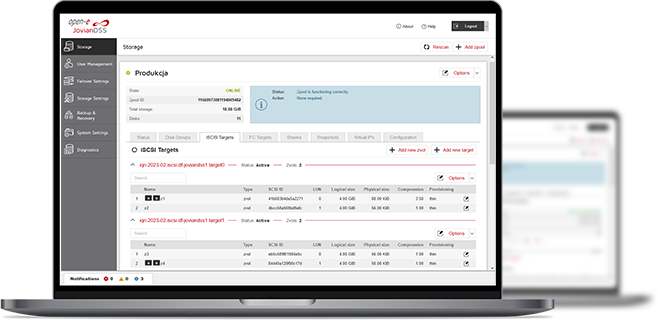
3-in-1 Complete Data Storage Solution
Accelerate Your Data Storage with ZFS-based Storage System

Live Demos with Open-E Engineers
- Several free online meetings - each discussing a different Open-E JovianDSS functionality.
- Chance to ask questions while and after the presentation.
- Opportunity to understand how Open-E JovianDSS works without any installation or setup.

Find the Exact License for Your Storage Setup
This calculator helps you to find the exact license required for your storage setup with Open-E JovianDSS, based on your individual specification.
Enter the configuration of your choice into the calculator and generate a PDF report.
Open-E Library